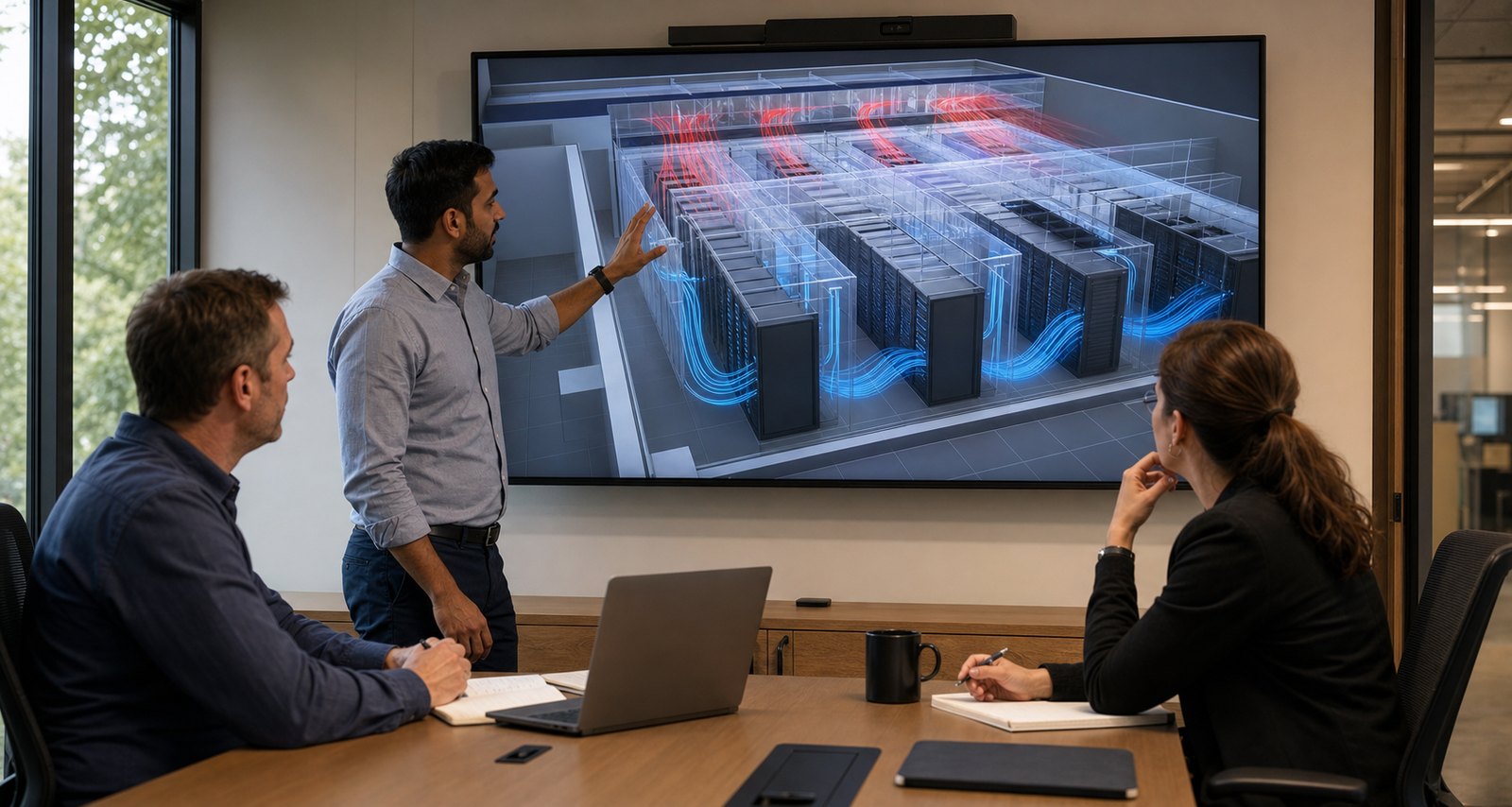
Data center airflow animation turns invisible cooling behavior into a clear visual explanation of how supply air reaches server intakes, absorbs heat, and returns to cooling equipment. When it is built from facility data and reviewed by engineers, the animation can help operators, designers, customers, and executives understand hot spots, bypass airflow, recirculation, containment, and the operational effect of proposed cooling changes.
The most useful animation is not a decorative stream of blue and red particles. It connects airflow to the actual rack layout, cooling equipment, supply and return paths, temperature data, and operating scenario. That distinction makes the visual suitable for training, retrofit planning, technical sales, stakeholder reviews, and facility communication without presenting an artistic effect as an engineering result.
What Is Data Center Airflow Animation?
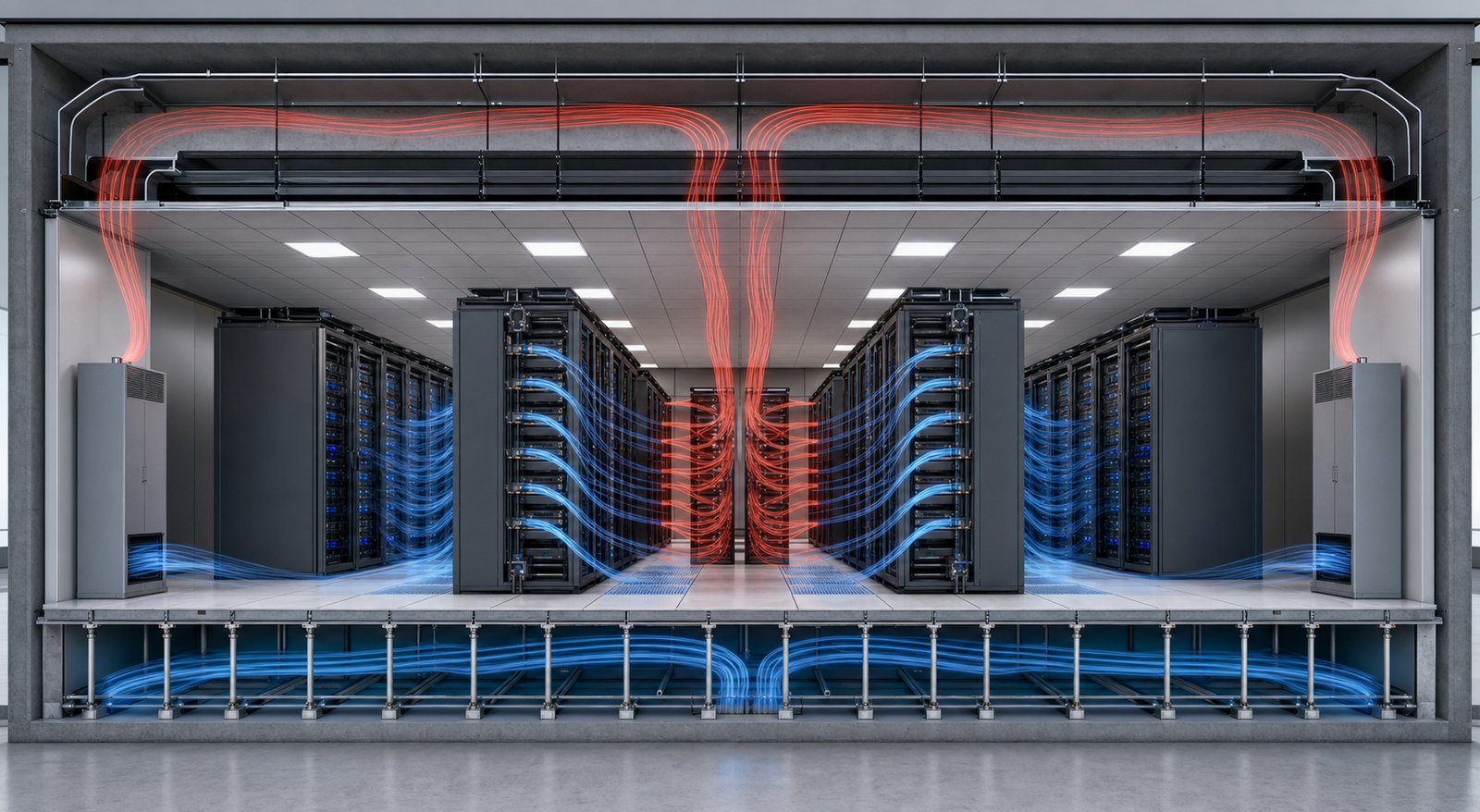
Data center airflow animation is a time-based 2D or 3D visualization of air movement and heat transfer within a data hall or cooling system. It may show cool supply air leaving a raised-floor plenum, overhead duct, perimeter unit, or in-row cooler; entering equipment through rack fronts; and carrying server heat toward a hot aisle, return plenum, or cooling coil.
A simple animation can explain the intended cooling concept. A more technical data center airflow visualization can be based on computational fluid dynamics (CFD), measured temperatures, pressure readings, equipment airflow specifications, or a validated engineering model. The source determines what the animation can honestly communicate.
The U.S. Department of Energy describes air management as the work of minimizing the mixing of cool supply air with hot equipment exhaust. Its current data center design guidance identifies bypass air and recirculation as central problems because both reduce cooling effectiveness. Animation gives teams a common view of those otherwise invisible paths.
Why Data Center Airflow Is Difficult to Explain
A data hall may look orderly while its thermal behavior is not. Air can leak around floor openings, pass through empty rack spaces, encounter cable obstructions, miss high-density equipment, or return to a cooling unit without removing useful heat. Hot exhaust can also travel over or around racks and re-enter equipment intakes.
These conditions are difficult to communicate with floor plans alone. A static temperature map shows where a problem exists at one moment, but it may not explain the path that created it. A spreadsheet can quantify airflow and temperature, but it does not give every reviewer an immediate spatial understanding of the room.
Animation adds time, direction, and sequence. It can show:
- Where supply air originates and which rack intakes it reaches
- Where cool air bypasses IT equipment
- Where hot exhaust recirculates into a cold aisle or neighboring rack
- How containment changes the separation of supply and return air
- How a failed fan, opened containment door, blocked tile, or rack change affects the intended path
- How heat moves through the room before returning to CRAC, CRAH, in-row, or other cooling equipment
This makes a data center cooling animation valuable for audiences that do not routinely interpret mechanical drawings or CFD plots. It also helps facilities and IT teams review the same scenario from a shared visual reference.
What a Technically Accurate Airflow Animation Should Show
The Complete Supply and Return Path
The animation should begin at the actual cooling source, not in the middle of the cold aisle. Depending on the facility, supply air may move through an underfloor plenum, overhead ductwork, wall system, in-row unit, rear-door heat exchanger, or another architecture. The return path should be equally clear.
Showing only the visible data hall can hide the cause of a problem. Underfloor cable congestion, misplaced perforated tiles, supply leakage, obstructed returns, or short-circuiting near cooling equipment may matter as much as the rack arrangement.
Rack-Level Airflow Direction
Most rack-mounted IT equipment is designed for front-to-rear airflow, which supports alternating cold and hot aisles. However, network equipment, blank rack spaces, reversed devices, cable openings, and other details can create different paths. The model should reflect the equipment configuration that matters to the intended lesson.
Blanking panels and sealed gaps deserve attention because airflow can bypass active equipment through open rack units. The animation should not imply that every liter of supplied air passes through servers when the source model or facility condition says otherwise.
Bypass Air, Recirculation, and Hot Spots
Bypass airflow occurs when cool air returns to cooling equipment without first passing through IT equipment. Recirculation occurs when hot rack exhaust reaches an equipment intake. Both conditions can coexist, making a room appear to have ample cooling capacity while particular racks experience elevated inlet temperatures.
A scientifically plausible visualization distinguishes these paths by direction, temperature, opacity, or another consistent visual rule. It should avoid random smoke-like motion that looks dramatic but obscures the engineering behavior.

Hot-Aisle or Cold-Aisle Containment
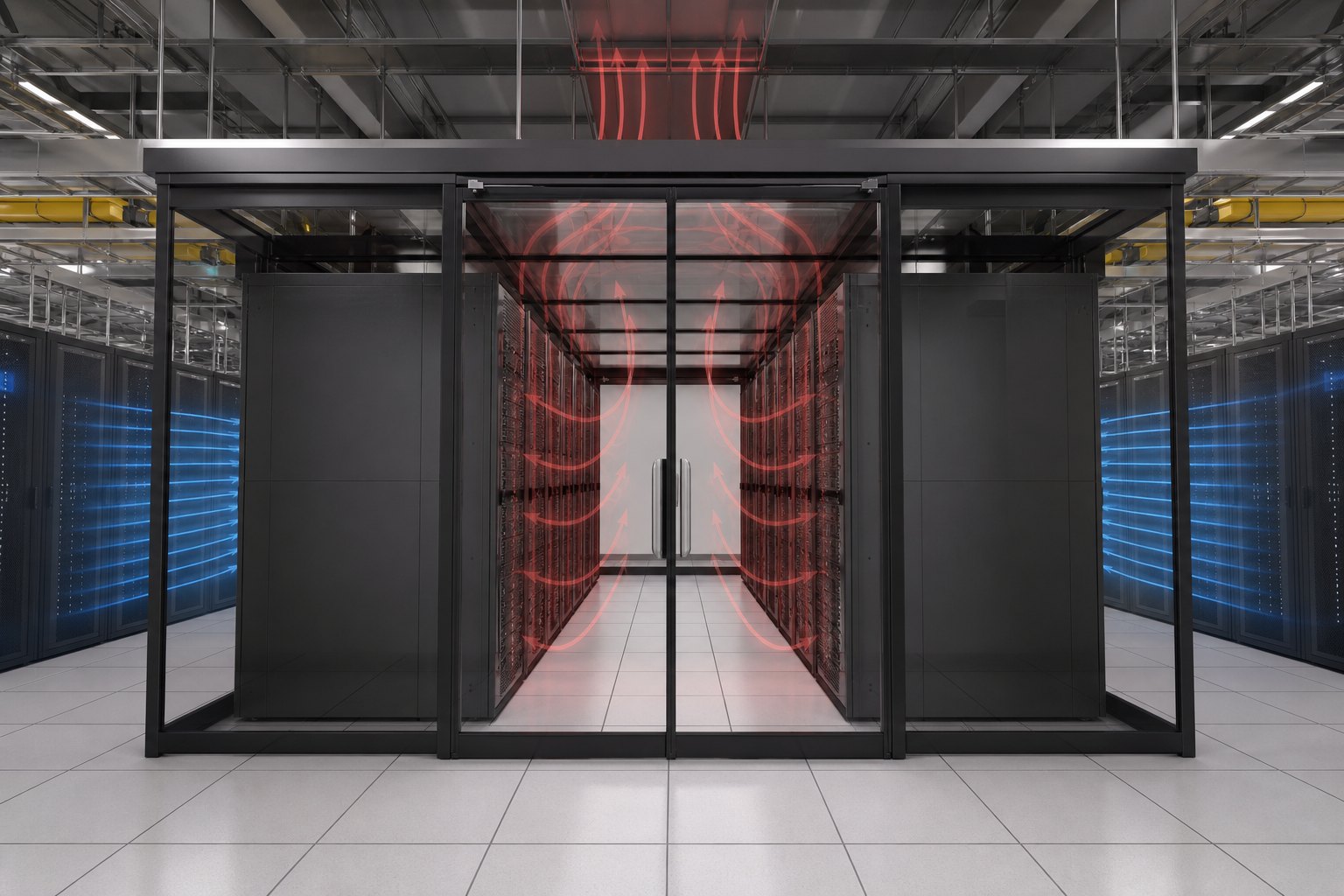
Containment reduces mixing by separating the cool supply stream from hot equipment exhaust. A hot aisle cold aisle animation can compare an open layout with full or partial containment and show why doors, roof panels, end-of-row barriers, rack chimneys, and pressure relationships matter.
Containment is not a generic visual box placed around racks. The animation should match the proposed or installed system and account for doors, gaps, fire protection requirements, ceiling returns, cooling-unit locations, and the direction of equipment airflow.
Operating States, Not Just Normal Conditions
A single steady-state view may be appropriate for a marketing overview, but operator training often needs multiple states. Useful scenarios can include normal operation, maintenance, loss of a cooling unit, changed rack density, opened containment, a blocked return, or a planned expansion.
Each state should be labeled in narration or accompanying graphics so viewers understand whether they are seeing measured behavior, a CFD prediction, an approved design intent, or a simplified teaching example.
How CFD Airflow Visualization Becomes Animation
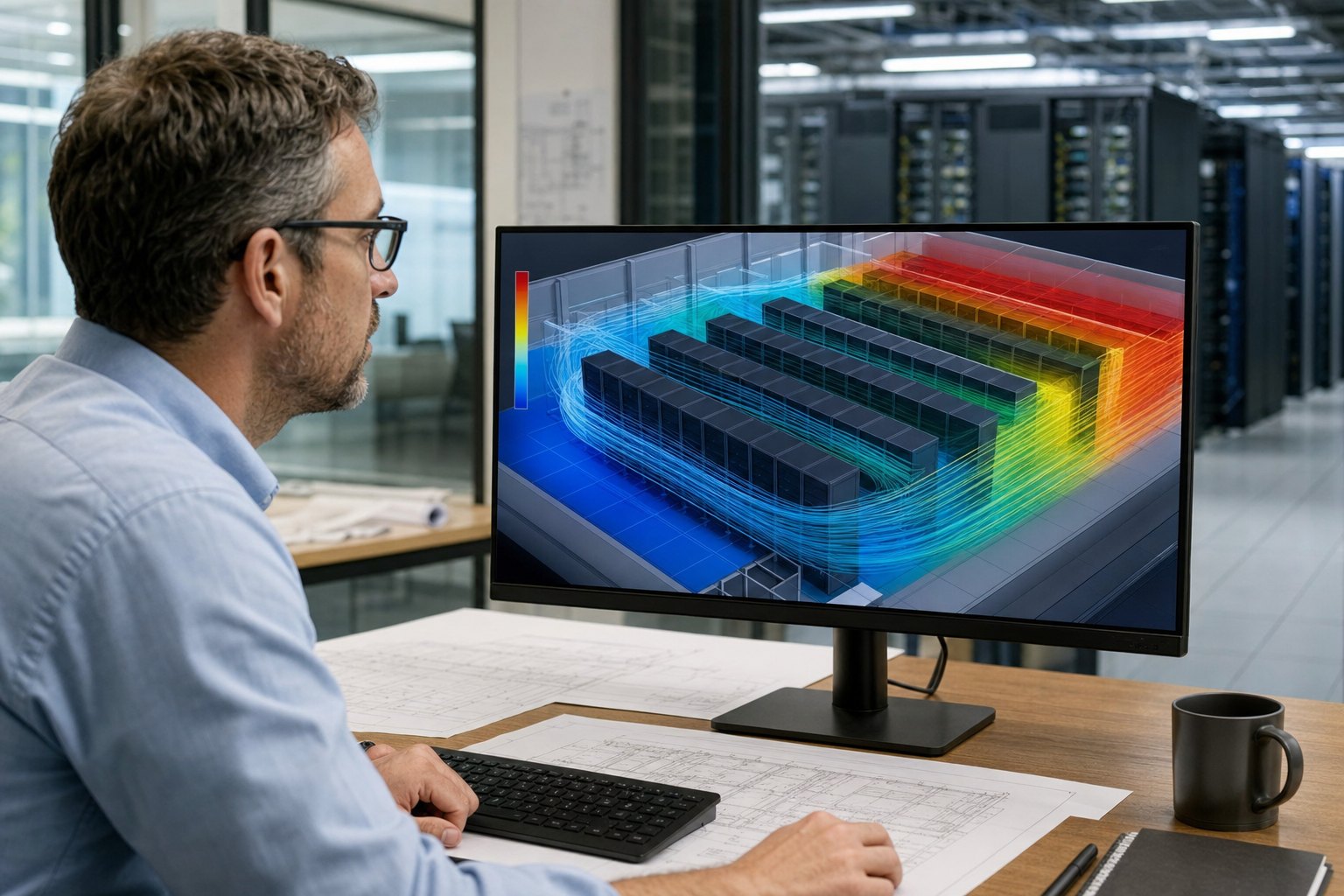
CFD software calculates airflow, pressure, and temperature behavior from a mathematical model. It can help engineers evaluate rack loads, cooling-unit performance, tile placement, containment, obstructions, and potential hot spots before changing the physical facility.
CFD airflow visualization may include streamlines, vector fields, temperature contours, isosurfaces, particle paths, or sectional views. These outputs are technically useful, but an unedited engineering view can overwhelm a non-specialist audience. Animation production organizes the approved results into a sequence with a controlled camera, visual hierarchy, legends, narration, and comparisons.
A responsible workflow keeps the CFD model and communication layer separate:
- Engineering source: A qualified engineer or CFD specialist defines assumptions, boundary conditions, loads, equipment performance, and scenarios.
- Data selection: The team chooses which fields and time states answer the communication question.
- Visual translation: Artists convert the approved data into readable paths, contours, cutaways, or overlays without changing the underlying conclusion.
- Technical review: Subject-matter experts confirm geometry, direction, temperature ranges, equipment states, and terminology.
- Final presentation: Lighting, materials, labels, narration, sound, and delivery formats are completed after technical approval.
The animation studio should not invent CFD results or claim that an illustrative airflow path validates a cooling design. When simulation data is unavailable, the finished piece should be described as a conceptual explanation based on the approved design intent.
Where Airflow Animation Creates Practical Value
Design and Retrofit Reviews
Design teams can use animation to compare an existing condition with a proposed change. A sequence may show the effect of aisle containment, tile relocation, cable cleanup, revised supply volume, a new return path, or higher-density racks. It helps reviewers see the relationship among architectural, mechanical, electrical, and IT decisions before construction.
Animation does not replace calculations, commissioning, or field measurement. Its role is to make the reviewed scenario understandable enough that stakeholders can ask better questions and recognize the operational consequence of a change.
Operator and Technician Training
Operations teams can use animation to teach why doors must remain closed, blanking panels must be replaced, cable penetrations must be sealed, perforated tiles must stay in approved locations, and temporary equipment cannot obstruct airflow. The visual can connect a small procedural action to the larger thermal system.
Training versions can pause at inspection points, highlight failure indicators, compare correct and incorrect states, and be divided into short modules for onboarding or refresher use.
Customer, Sales, and Investor Communication
Colocation providers, equipment manufacturers, engineering firms, and cooling-technology companies often need to explain infrastructure that customers cannot inspect easily. A 3D data center animation can reveal redundant cooling paths, containment, equipment placement, expansion capacity, or a product’s role without taking the viewer through every mechanical detail.
The visual should remain accurate while changing emphasis for the audience. An operator may need temperatures, states, and control logic. A customer may need resilience and service continuity. An investor may need the relationship between capacity, efficiency, and future expansion.
Standard Operating Procedures and Incident Preparedness
Animation can support procedures for maintenance windows, cooling-unit outages, containment access, alarm response, or temporary load changes. It is especially useful when the response depends on a sequence of actions across more than one team.
These scenarios require careful language. A training animation should follow the facility’s approved procedure and safety requirements rather than offering generic operational instructions.
A Production Workflow for Data Center Cooling Animation
1. Define the Decision or Learning Objective
Begin with one clear outcome. Examples include explaining why containment is being installed, training staff to preserve rack airflow, comparing two retrofit options, or showing customers how cooling redundancy works. Trying to cover every mechanical and electrical system in one video usually weakens the main lesson.
2. Assemble the Technical Source Package
Useful inputs may include BIM or CAD files, rack elevations, mechanical plans, equipment schedules, cooling-unit specifications, CFD exports, temperature and pressure data, site photography, control sequences, and existing operating procedures. The project team should identify which files are current and which details must remain confidential.
3. Build a Visual Accuracy Matrix
Not every element requires the same fidelity. Rack geometry may need to match the facility, while distant architectural details can be simplified. Airflow direction and containment boundaries may need engineering approval, while surface materials can be chosen for readability. Recording those decisions prevents realism from being confused with accuracy.
4. Approve Storyboards and Grayscale Previsualization
Storyboards establish the teaching sequence. A grayscale previsualization then tests camera movement, timing, cutaways, airflow overlays, and scene order before final rendering. Technical corrections are faster and less expensive at this stage than after materials, lighting, simulation effects, and compositing are complete.
5. Review Technical and Communication Layers Separately
Facilities engineers, CFD specialists, commissioning teams, or equipment vendors should review technical claims. Marketing, training, and executive stakeholders should review clarity, pacing, branding, and distribution needs. Separating these responsibilities helps prevent contradictory feedback.
6. Deliver Reusable Assets
The final package may include a narrated master, silent presentation loop, short training chapters, still frames, transparent overlays, and alternate aspect ratios. Planning these formats early allows the same approved model and airflow language to support several communication needs.
Why Choose Austin Visuals for Data Center Airflow Animation?

Austin Visuals has direct experience translating data center infrastructure into 3D communication. For OnRamp Data Centers, the team visualized a 42,000-square-foot facility, its internal structure, airflow system, cooling process, and relationship to redundant power. The project used client CAD data, custom modeling, storyboards for critical shots, and a grayscale previsualization before the final production phase.
This experience shapes a specific approach to airflow projects: establish what the source data proves, choose the smallest number of views needed to explain it, and let technical reviewers approve the underlying behavior before visual polish is added.
Our Clients include:
One Visual Grammar for Several Audiences
Data center stakeholders use different technical vocabularies. Austin Visuals can develop one consistent visual grammar for cool supply air, hot return air, pressure, temperature, equipment state, and containment boundaries, then vary the amount of detail by audience. That keeps a sales version and an operator-training version from contradicting each other.
Facility Geometry Without Unnecessary Modeling
A complete digital twin is not required for every communication goal. The team can use CAD, drawings, photographs, and expert input to model the racks, plenums, cooling equipment, barriers, and room features that affect the intended explanation while simplifying irrelevant areas. This focuses budget and review time on the parts that carry technical meaning.
Approval Before Expensive Rendering
Airflow paths, camera positions, equipment states, and labels can be reviewed in storyboards and grayscale scenes. That staged process protects the project from late corrections and gives engineers a practical way to comment before the images become visually dense.
The OnRamp data center animation case study shows this workflow in practice. Austin Visuals also provides 3D technical animation services for teams that need CAD-based process, product, facility, or training visuals.
How Much Does a Data Center Airflow Animation Cost?
Cost depends on facility size, source-file quality, modeling requirements, number of cooling scenarios, CFD availability, visual fidelity, runtime, narration, review burden, and final deliverables. A conceptual sequence based on an existing model costs less than a detailed facility reconstruction with several engineering states and audience versions.
Projects are easier to scope when the request identifies:
- The audience and decision the animation must support
- Whether airflow is conceptual, measured, or based on approved CFD data
- The facility areas and equipment that must be modeled accurately
- The number of normal, failure, retrofit, or expansion scenarios
- The required runtime, narration, labels, languages, and delivery formats
- The people responsible for technical and communication approval
Austin Visuals publishes general technical-animation projects in a broad range because scope varies significantly. A custom quote is prepared after the team reviews the source files, accuracy requirements, and approval process.
Conclusion
Data center airflow animation makes cooling paths, heat movement, containment, bypass, and recirculation visible to people who may not work directly with mechanical plans or CFD tools. Its value comes from technical grounding: facility geometry, equipment behavior, data sources, scenario labels, and subject-matter review must guide the visual.
The strongest projects separate engineering evidence from presentation design. CFD, measurements, or approved design intent establish the behavior; animation then selects the views, timing, overlays, and narration needed to communicate that behavior clearly.
Need to explain data center airflow, cooling redundancy, or a planned retrofit?
Send Austin Visuals the audience, facility drawings, available CAD or BIM files, airflow data, required scenarios, and review team. Call (512) 591-8024 or use the Austin Visuals contact form to request a custom production scope.
Frequently Asked Questions
What is data center airflow animation?
Data center airflow animation is a time-based visualization of how cooling air moves from supply equipment to server intakes and how heated exhaust returns to the cooling system. It can be conceptual or built from measured data and CFD results, depending on the project.
How does airflow work in a data center?
Airflow generally delivers cool air to the front of IT equipment, moves through the servers as heat is absorbed, and carries hot exhaust toward a return path. Layout, containment, pressure, obstructions, leakage, and equipment airflow direction determine whether that path works efficiently.
What is the difference between an airflow animation and a CFD simulation?
A CFD simulation calculates airflow, pressure, and temperature behavior from defined engineering inputs, while an animation organizes approved results or design intent into a visual explanation. Animation can present CFD data, but it does not replace or independently validate the simulation.
Can animation show hot spots and air recirculation?
Yes, animation can show hot spots and recirculation when those conditions are supported by CFD, measurements, or an approved technical scenario. The visual should distinguish calculated or measured behavior from conceptual airflow added only for explanation.
What files are needed to create a 3D data center animation?
Common source files include CAD or BIM models, floor plans, rack elevations, mechanical drawings, equipment schedules, CFD exports, temperature data, site photographs, and operating procedures. The exact package depends on the required accuracy and audience.
How long does a data center airflow animation take?
A focused animation may take several weeks, while a detailed facility model with multiple technical scenarios can require several months. Source readiness, modeling scope, CFD coordination, review speed, rendering quality, and deliverable count determine the schedule.
Can one airflow animation be reused for training and marketing?
Yes, one approved 3D environment can support training and marketing when the project is planned for both audiences. The technical model and visual rules stay consistent while narration, scene order, labels, runtime, and calls to action are adapted.