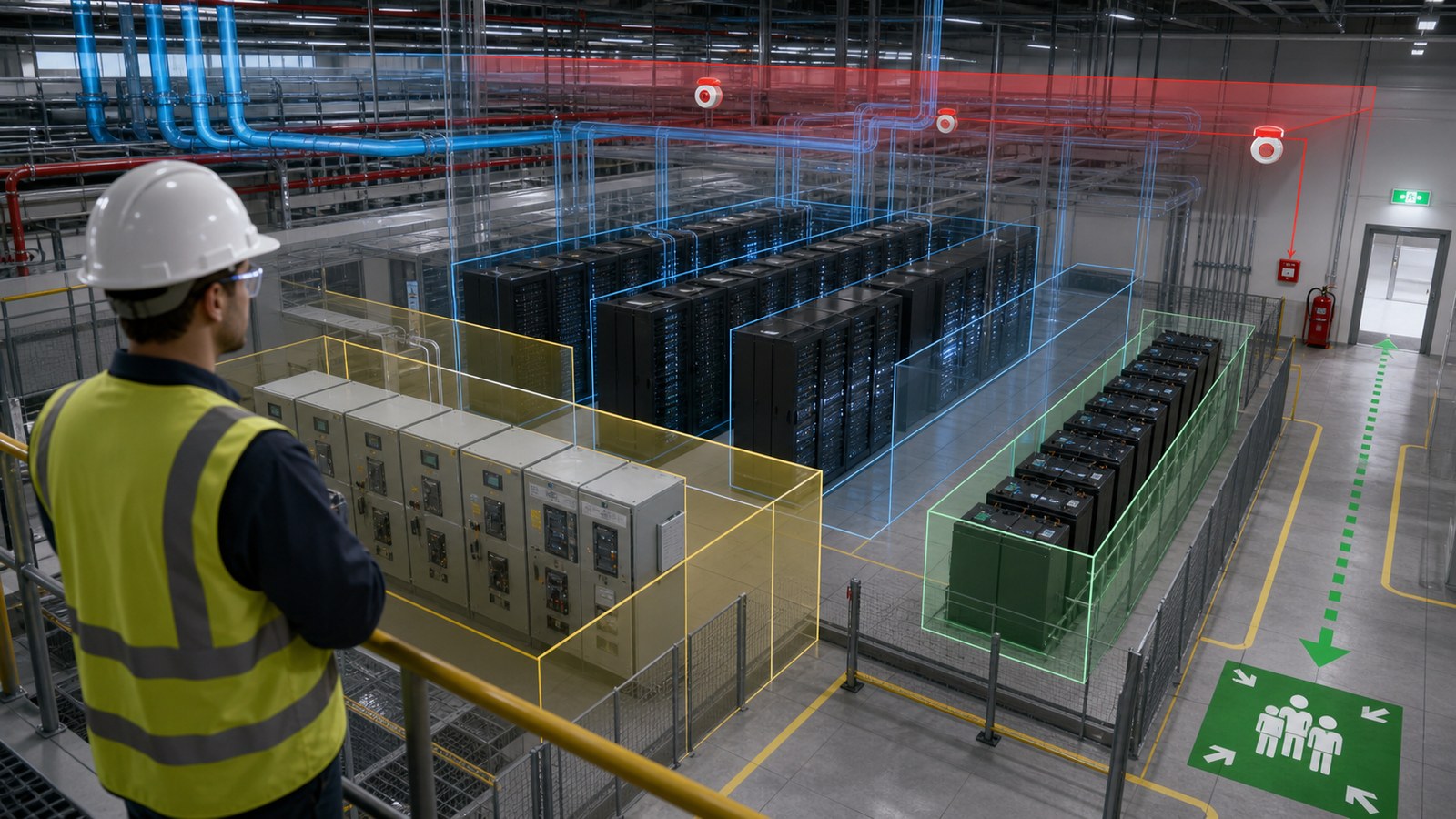
Data center safety training animation turns electrical, stored-energy, battery, cooling, fire, access-control, and emergency procedures into clear visual sequences that workers can study before entering a live facility. The most useful programs are site-specific, role-based, and reviewed by the employer’s qualified safety, electrical, operations, and emergency-response personnel.
A data center can appear orderly and quiet while containing high fault current, energized distribution equipment, rotating machinery, chemical and battery hazards, pressurized cooling systems, heavy components, restricted work zones, and critical operations that cannot be interrupted casually. Conventional slides can name those hazards, but realistic 3D safety animation can show where they exist, how a task changes system state, and which decisions separate normal work from an escalating incident.
Animation is a communication layer, not a substitute for the employer’s hazard assessment, energy-control program, emergency action plan, equipment labels, permits, hands-on qualification, or applicable law and standards. Its value is making approved procedures visible and memorable without asking trainees to learn inside an energized or operational environment.
Contact us at info@austinvisuals.com or call (512) 591-8024.
What Is Data Center Safety Training Animation?
Data center safety training animation is a visual learning asset built around a real facility, equipment type, work task, or emergency procedure. It may use 2D diagrams for policy and decision logic, 3D scenes for spatial or mechanical understanding, or a hybrid format that combines both.
Unlike a promotional flythrough, the training sequence is organized around worker decisions. It shows who may enter, what must be verified, which boundary cannot be crossed, where energy is isolated, what normal indications look like, how an abnormal condition is reported, and when the correct action is to stop and escalate.
A complete data center safety training program may include a general orientation for all personnel, contractor induction, task-specific modules, electrical safety training animation, emergency drills, microlearning refreshers, and supervisor-led discussion scenarios. Each module should have a defined audience, learning objective, source procedure, required reviewer, and method for confirming understanding.
Which Data Center Hazards Benefit Most From Animation?
Electrical shock and arc-flash exposure
Data centers rely on utility feeds, switchgear, transformers, generators, uninterruptible power supplies, power distribution equipment, busway, rack-level distribution, and transfer systems. A one-line diagram describes the electrical architecture, but it may not show a new worker where exposed parts, approach boundaries, access restrictions, or alternate sources appear in the physical room.
An arc flash training visualization can connect the approved one-line, equipment labels, room geometry, task boundary, PPE decision, and escalation path. It can also demonstrate a critical principle: equipment that is switched off is not automatically in an electrically safe work condition. The animation should follow the employer’s procedure for isolation, lockout or tagout where applicable, verification, and release rather than inventing a generic sequence.
Role separation matters. Unqualified personnel need to recognize hazards and stay outside restricted work. Qualified persons require training appropriate to their assignments, equipment, voltage, boundaries, and safe work practices. A single dramatic arc-flash clip cannot meet both needs.
Hazardous and stored energy
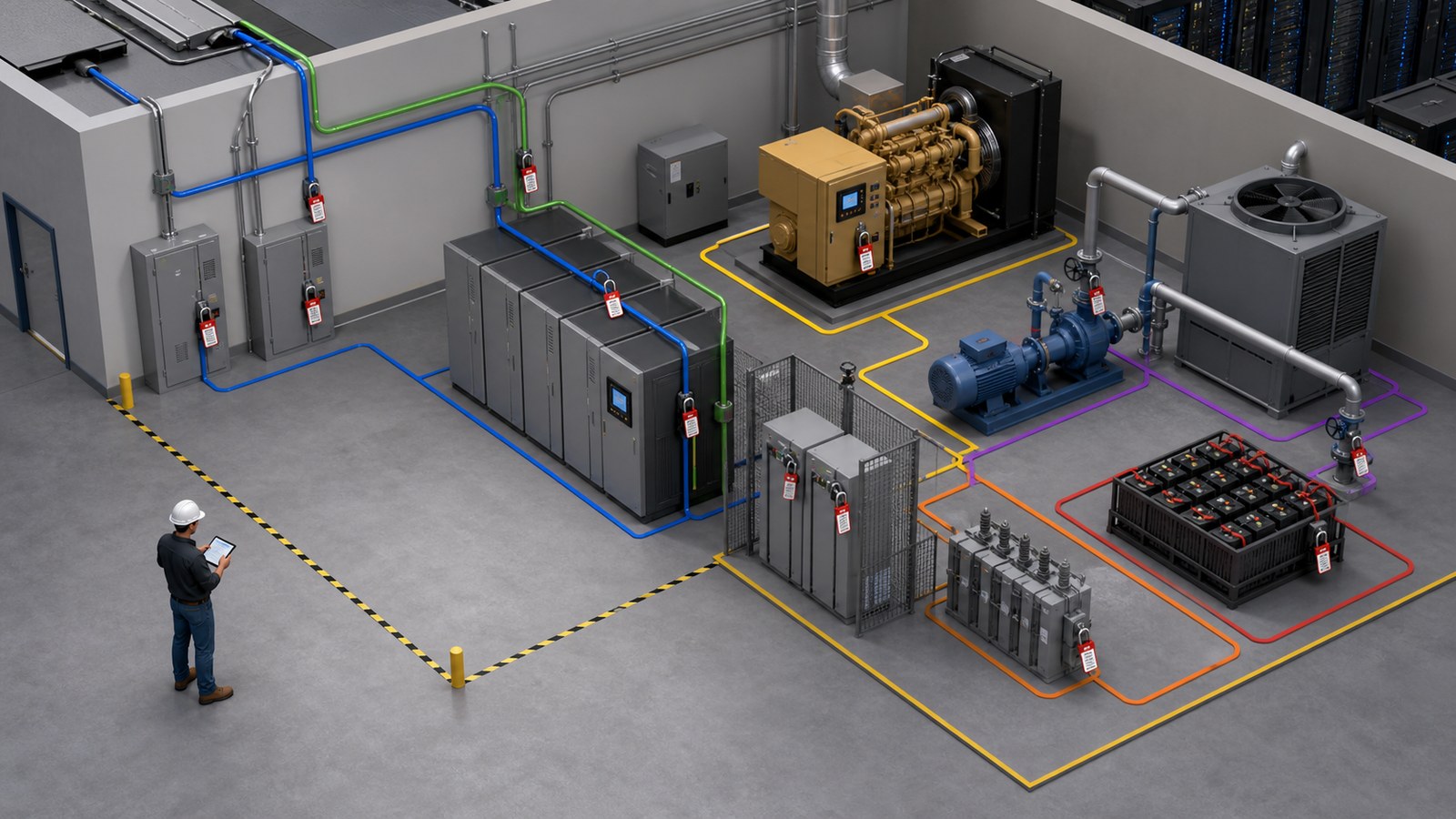
Electrical energy is only one part of data center isolation. Generators may start automatically. Fans, pumps, dampers, actuators, flywheels, capacitors, batteries, compressed systems, elevated components, and liquid-cooling loops can retain or reintroduce energy. Redundant architecture may also create an unexpected backfeed or alternate operating path.
A 3D safety animation can trace each energy source to its isolation point and show the difference between control commands, disconnecting means, physical isolation, stored-energy dissipation, verification, and return to service. It should make ownership visible: who applies controls, who verifies status, who is affected, and who authorizes restoration.
UPS batteries and energy storage
Battery hazards vary by chemistry, installation, enclosure, scale, ventilation, monitoring, and manufacturer instructions. Potential concerns may include electrical energy, short circuit, electrolyte exposure, off-gassing, thermal events, fire, handling weight, damaged modules, and restricted response actions.
Animation can show normal indicators, access limits, prohibited actions, ventilation paths, detection points, spill or exposure response, and evacuation triggers defined by the site. The content must distinguish lead-acid systems, lithium-ion systems, rack-integrated backup, UPS installations, and larger energy-storage systems rather than representing all batteries with one generic room.
Cooling equipment and liquid systems
Cooling infrastructure can involve air handlers, computer-room units, pumps, valves, cooling towers, refrigerants, water-treatment chemicals, overhead piping, direct-to-chip loops, coolant distribution units, and immersion systems. Maintenance introduces electrical, mechanical, pressure, temperature, chemical, lifting, slip, and leak hazards.
A training module can follow the approved shutdown boundary, show hidden pressure or residual flow, identify leak-detection and containment features, and demonstrate the site response to water or dielectric fluid near energized equipment. The scene should never imply that a worker may open, drain, or service a system merely because the animation makes it look simple.
Fire, smoke, alarms, and emergency response
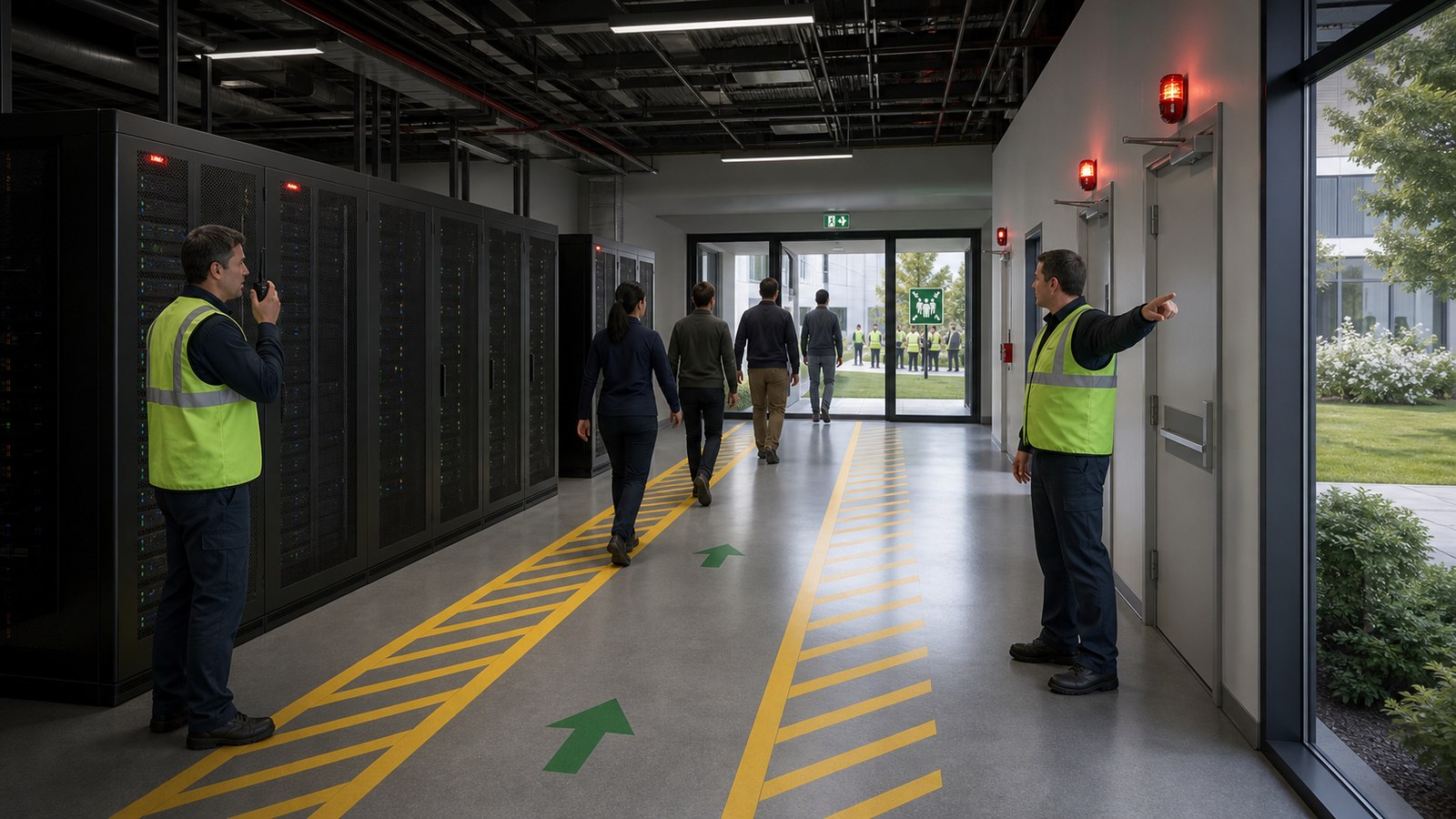
Data center emergency response training should show how the facility’s alarm signals, detection systems, suppression strategy, exits, assembly points, accountability process, and critical-operation roles work together. Personnel must know whether they evacuate immediately, perform an assigned shutdown, assist others, or call a designated contact.
Animation is especially useful when a facility has several secure rooms, mantraps, alternate exits, gaseous suppression, battery areas, generator yards, loading zones, or phased construction. A progressive scenario can show smoke migration, door behavior, alarm states, and blocked-route alternatives without creating a real emergency.
Material handling, access, and everyday work
Many incidents begin with ordinary movement rather than spectacular failure. Server racks, battery cabinets, cable reels, floor panels, ladders, carts, temporary cords, packaging, wet surfaces, overhead work, and narrow aisles create lifting, pinch-point, trip, fall, and struck-by risks.
A visual module can demonstrate delivery routes, equipment clearances, spotter roles, floor-loading controls, housekeeping expectations, raised-floor access, barricades, and hand placement. These routine details deserve the same realism as the electrical room because they are part of daily exposure.
How Should Training Change for Different Roles?
Effective training begins with a role matrix. Visitors need orientation, escort rules, alarms, exits, prohibited areas, and reporting expectations. General operations staff need site systems, normal versus abnormal indications, work control, communication, and emergency responsibilities. Qualified electrical workers need task- and equipment-specific instruction that supports their formal qualification.
Mechanical technicians may need rotating-equipment isolation, pressure release, chemical information, leak response, and lifting controls. IT technicians need rack access, power-cord practices, hot-swap boundaries, material handling, electrostatic controls, and escalation rules. Security staff need emergency access, responder coordination, accountability, and the limits of their technical role.
Construction workers and vendors need a current view of energized areas, temporary conditions, logistics routes, simultaneous operations, permit requirements, and interfaces with the operating facility. Emergency responders may require pre-incident familiarization that is different from employee evacuation training.
One universal video cannot carry all of this information without becoming either vague or overwhelming. Build a shared core, then create short role-based branches. The same approved 3D facility can support each branch while changing camera position, labels, decisions, and depth.
youtube.com/watch?v=Y3f3vqKRSuY&source_ve_path=MjM4NTE&embeds_referring_euri=https%3A%2F%2Faustinvisuals.com%2F
What Can 3D Animation Show That Conventional Training Cannot?
Three-dimensional visualization is valuable when the learning problem is spatial, sequential, hidden, or too hazardous to demonstrate live. A trainee can move from a campus view to a room, equipment lineup, cabinet, component, and energy path without losing orientation.
Cutaways can reveal bus connections, airflow, coolant routing, battery modules, stored energy, or redundant feeds while clearly identifying which information is simplified. Color and motion can isolate one operating state at a time. A first-person view can rehearse a walkdown, while an overhead view can explain boundaries and evacuation.
Animation also supports controlled failure scenarios. The sequence can pause before a decision, ask what the worker should do, compare a correct and incorrect path, and then reveal the consequence without sensationalizing injury. This makes 3D safety animation useful for discussion-based learning rather than passive viewing.
How Is a Site-Specific Training Animation Produced?
1. Define the learning decision
Start with what the learner must recognize or do, not with a request for an impressive facility model. Define the audience, prerequisite knowledge, task boundary, success criteria, delivery platform, and assessment method.
2. Establish the approved source set
Inputs may include site plans, one-lines, equipment manuals, standard operating procedures, energy-control procedures, emergency plans, labels, photographs, video, BIM or CAD, incident lessons, and interviews. Assign an owner and revision date to every governing source.
3. Map roles, hazards, and decision points
Create a sequence table connecting each shot to the hazard, required behavior, source, reviewer, and on-screen message. This prevents visual polish from outrunning the approved procedure.
4. Build only the required level of detail
A site orientation may need recognizable rooms and routes but not every fastener. A switchgear task may need accurate lineup, labels, doors, indicators, and isolation points. Modeling priorities should follow the learning objective.
5. Review in low-cost stages
Approve script, storyboard, geometry, labels, motion, and final appearance separately. Safety, electrical, operations, facilities, security, and training reviewers should approve only the content within their responsibility.
6. Deliver a controlled training package
Outputs may include a narrated master, captioned version, silent floor display, short refreshers, still job aids, quiz clips, LMS files, multilingual editions, and editable source assets. Version control should identify the site, procedure revision, audience, and approval date.
How Should the Training Be Validated?
Validation has several layers. Technical reviewers confirm equipment, system states, labels, energy paths, and procedure order. Safety reviewers verify hazard language, required controls, PPE references, stop-work points, and emergency actions. Operations reviewers check that the sequence matches actual site access and work coordination.
Representative learners should then complete a comprehension test or scenario. Ask them to identify the hazard, choose the next action, locate the correct boundary, or explain when to stop. A visually impressive module that produces the wrong decision has failed.
Training owners also need a change process. Data centers evolve through capacity additions, equipment replacement, revised switching, new cooling, battery upgrades, construction phases, and policy changes. Keep the source model modular and record which scenes depend on each procedure or equipment revision.
Finally, track the animation as one part of a broader training system. Completion records, hands-on demonstrations, authorization, permits, supervision, drills, and periodic review remain separate controls. The module should state its scope clearly so viewers do not mistake awareness training for qualification.
Why Work With Austin Visuals?
Austin Visuals combines technical 3D production with instructional communication. The team can work from engineering sources and approved procedures, build a reviewable facility or equipment model, and then adapt that asset into role-specific sequences rather than producing an unrelated video for every audience.
The studio’s staged workflow helps subject-matter experts review the right decisions early. Script and storyboard establish instructional logic. Gray-model reviews confirm geometry and camera access. Animation reviews confirm sequence and system state. Lighting, rendering, narration, captions, and final editing follow after the technical foundation is stable.
Austin Visuals has experience translating data center architecture into understandable power, cooling, airflow, and facility communication. See the OnRamp data center animation case study, data center power redundancy animation, and data center liquid cooling animation for related visual approaches.

Conclusion
Data center safety training animation is most effective when it explains a real decision inside an approved safety system. It can reveal hidden energy, clarify restricted boundaries, rehearse emergency actions, and connect procedures to the physical facility. It cannot create qualification, authorize work, or replace the employer’s site-specific controls.
Begin with roles and learning objectives, establish controlled sources, model the details that matter, review in stages, test comprehension, and maintain the content as the facility changes. That approach turns animation from a one-time video into a reusable safety communication asset.
Contact us at info@austinvisuals.com or call (512) 591-8024.
Frequently Asked Questions
What is data center safety training animation?
It is a 2D or 3D visual training asset that explains site hazards, equipment states, approved procedures, boundaries, and emergency actions. It should be built for a defined audience and reviewed against current facility documents.
Which hazards should a data center safety module cover?
Coverage depends on the site and role. Common topics include electrical shock, arc flash, hazardous energy, UPS batteries, generators, cooling systems, chemicals, material handling, raised floors, fire alarms, suppression, evacuation, access control, and simultaneous construction work.
Can animation replace hands-on electrical safety training?
No. Animation can support awareness and explain approved procedures, but it does not replace required classroom or on-the-job training, demonstrated skills, employer qualification, authorization, PPE selection, permits, or supervision.
Can existing BIM or CAD files be used?
Yes. BIM, CAD, one-lines, site plans, photographs, scans, and equipment references can reduce modeling effort. Files still need review, simplification, security controls, and confirmation that they represent the current installed condition.
How do you protect confidential facility information?
Define access, transfer, storage, reviewer, and delivery requirements before production. The model can omit unnecessary site details, use controlled views, separate sensitive modules, and provide only the information required for the learning objective.
How long does a data center training animation take?
A focused equipment or procedure module may take several weeks. A detailed site orientation or multi-role library may require several months. Source readiness, model complexity, technical review, revisions, languages, and LMS requirements affect the schedule.
How often should an animation be updated?
Review it whenever the governing procedure, equipment, layout, alarm, route, role, or hazard changes, and during the organization’s normal training-content review cycle. Version labels should identify the applicable site and source revision.