Engineering animation for mechanical systems turns complex assemblies, hidden components, and timed motion into visual explanations that engineers, operators, buyers, and project stakeholders can follow.
Austin Visuals creates realistic mechanical animation, cutaways, exploded views, operating sequences, and technical presentation assets with staged client review. To discuss a project, call (512) 591-8024 or email info@austinvisuals.com.
A mechanical system rarely communicates its full story from the outside. Housings conceal shafts and bearings. Guards hide power transmission. A machine cycle may combine rotary, reciprocating, indexing, pneumatic, and linear motion in fractions of a second. Engineering animation provides controlled visibility, timing, and viewpoint so the audience can understand how the parts relate without standing beside an operating hazard.
What Is Engineering Animation for Mechanical Systems?
Engineering animation for mechanical systems is a structured 2D or 3D representation of a machine, mechanism, or assembly over time. It can show exterior configuration, component relationships, motion, assembly order, disassembly, maintenance access, material transfer, operator interaction, and approved analysis results. The purpose is communication: turning source information into a sequence that makes the intended relationship easier to see.
A mechanical engineering animation may focus on one gearbox, actuator, valve, robotic end effector, or linkage. It may also present a complete system that integrates drives, conveyors, tooling, sensors, guards, pneumatics, hydraulics, and controls. The level of detail should match the audience and decision rather than displaying every fastener merely because it exists in CAD.
When Mechanical Animation Adds the Most Value
Animation is especially useful when direct observation is incomplete, unsafe, too fast, too slow, too small, too large, or unavailable. It can explain a prototype before fabrication, show internal relationships that a camera cannot record, or place an approved product model in a realistic operating environment.
Common applications include:
- Design communication: establish configuration, interfaces, clearances, access, and operating sequence for review discussions.
- Installation planning: show lift direction, alignment, supports, connection points, and a planned sequence when the underlying procedure is approved.
- Operations and maintenance: explain normal motion, isolation boundaries, inspection points, disassembly order, and replacement steps.
- Training: slow a cycle, repeat a critical event, and give learners a consistent view of components and hazards.
- Sales and stakeholder communication: reveal why an engineered feature matters without requiring every viewer to interpret a full drawing package.
- Documentation support: produce still images and short sequences that complement manuals, presentations, and digital work instructions.
The strongest use case starts with a clear question. If the audience needs to understand how torque moves from a motor to an output shaft, the animation should emphasize that power path. If the question is service access, the camera and exploded sequence should prioritize the technician’s approach, fastener order, part clearance, and safe system state.
Establish the Complete System Before Moving Inside
A good sequence gives the audience orientation before detail. Begin with the complete machine or assembly in its normal configuration. Identify the product boundary, major modules, mounting, input, output, utilities, guarding, and the direction of work or material flow. Then move closer to the mechanism that answers the audience’s question.
This hierarchy prevents a common problem: an impressive cutaway that leaves viewers unsure where the component sits in the real system. A complete exterior view also provides a reference for scale and helps reviewers verify that the correct configuration and revision are being shown.
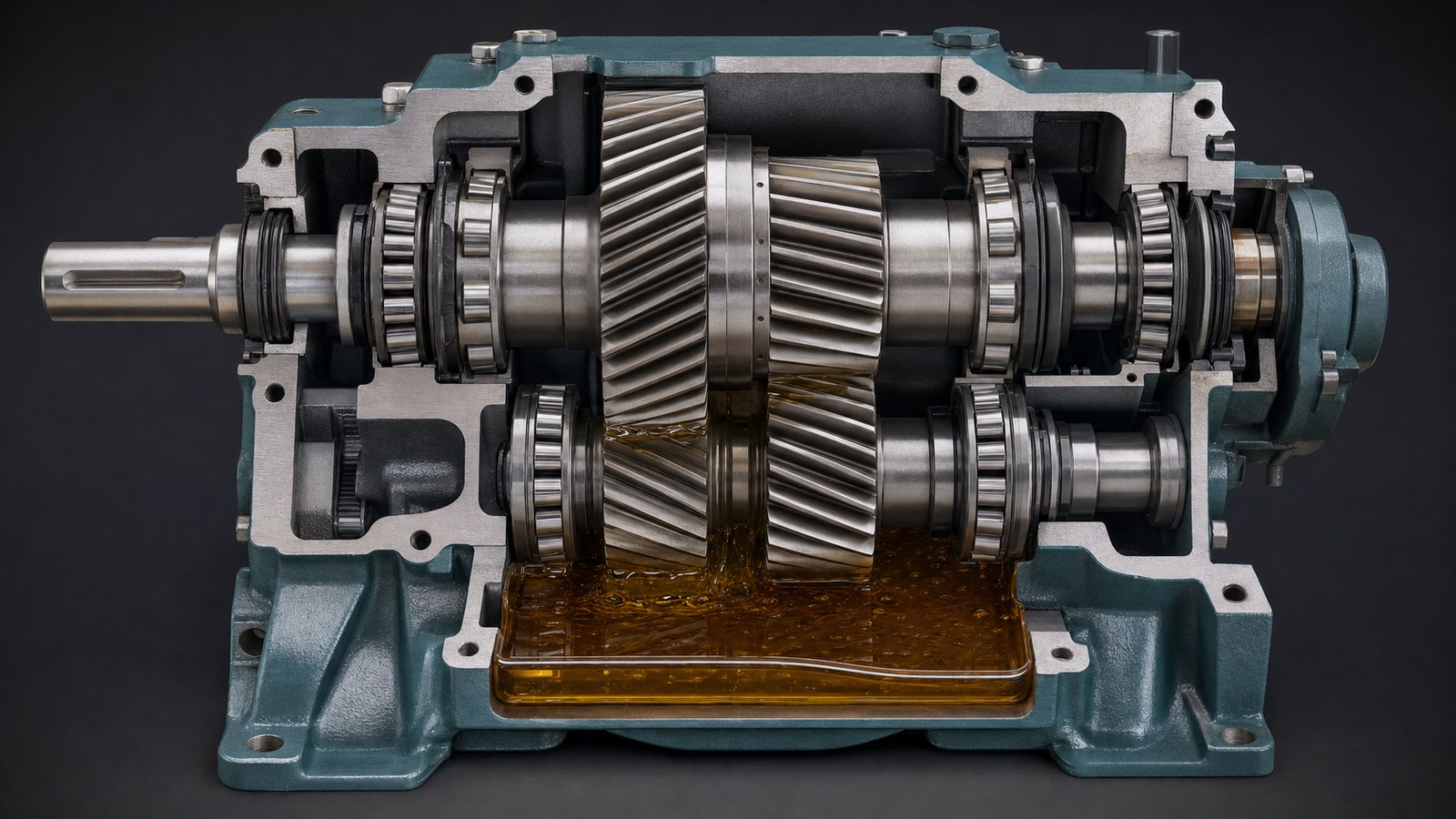
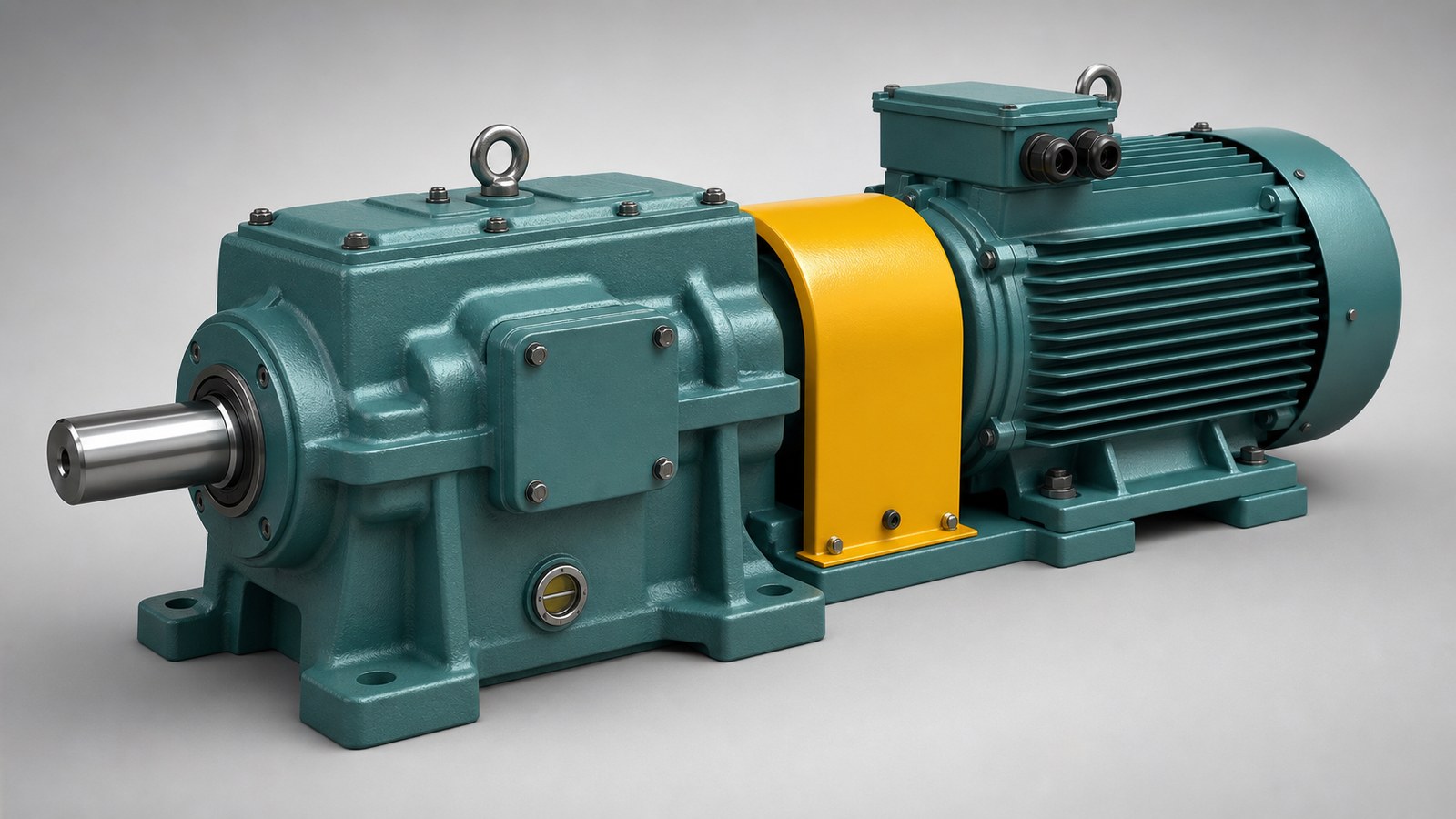
For a gearbox, the opening might show the motor, enclosed coupling, reducer housing, mounting feet, output shaft, inspection cover, and lubrication features. The camera can then section the housing and reveal the transmission. For a production machine, the sequence might show the guarded cell, infeed, index table, tooling, outfeed, and operator position before isolating one station.
Explain Kinematics, Timing, and the Power Path
Mechanical systems communicate through motion. The audience may need to follow rotation, translation, reciprocation, oscillation, indexing, dwell, acceleration, or the relationship between several axes. A 3D mechanical animation can slow these events, pause at a transfer point, separate simultaneous actions, and repeat one cycle from multiple viewpoints.
Motion should be based on approved information. Gear ratios, shaft speed, cam timing, stroke, joint limits, pitch, travel, sequence logic, and direction should come from CAD constraints, engineering calculations, motion studies, controls documentation, or subject-matter review. The animation team should not infer an operating cycle from appearance alone.
Color and overlays can help, but they should remain disciplined. A highlighted shaft can mark the active power path. A restrained trace can show a carriage position over time. A simple timing bar can connect mechanical motion to a cycle stage. These devices should explain relationships without making the screen look like an unsupported simulation dashboard.
Use Cutaways and Exploded Views with Purpose
Cutaways reveal components while preserving their installed relationship. They are useful for bearings, seals, gear meshes, lubrication zones, valves, internal linkages, and nested housings. The cut plane should expose the intended mechanism without removing the structure needed to understand support and alignment.
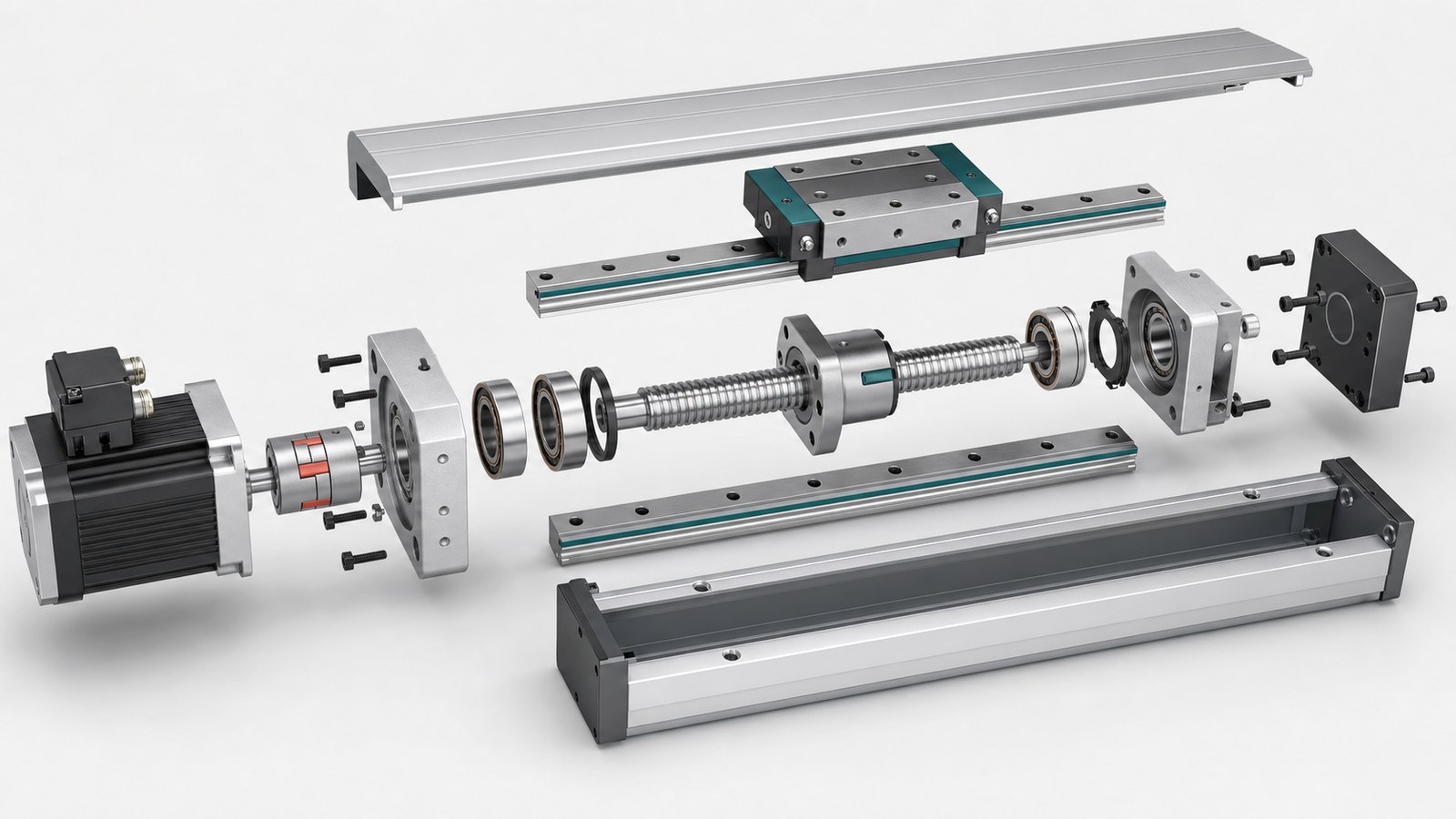
Exploded views answer a different question: how parts relate in assembly or service order. Each component should move along a credible removal path, remain aligned with mating surfaces, and preserve the hierarchy of subassemblies. Fasteners, seals, spacers, bearings, and retainers should not float randomly around a hero product.

For an electromechanical actuator, an exploded sequence can connect the motor, coupling, bearing support, ball screw, ball nut, carriage, rails, seals, and housing. A service version may also show tool access and a safe disassembled state. An advertising version may use the same approved model but shorten the sequence to one feature and benefit.
Animation Is Not Automatically Engineering Simulation
Animation and simulation can share visual language, but they are not interchangeable. Animation can prescribe a motion path and communicate approved results. Engineering simulation uses defined models, material properties, loads, boundary conditions, contacts, solver methods, and validation to calculate behavior.
Therefore, a visual arrow does not prove a load path, a colored surface does not prove stress, and a deformed shape does not prove displacement. FEA, CFD, thermal analysis, multibody dynamics, fatigue calculations, and tolerance studies should only be presented as analysis results when the client supplies or approves the underlying data and interpretation.
A responsible mechanical system visualization labels representative motion and conceptual behavior when necessary. If approved simulation data is available, the production team can map it into a clearer sequence while preserving units, scale, legend, time basis, assumptions, and the distinction between measured and calculated values.
Represent Machine Safety and Guarding Credibly
Mechanical animation can reveal dangerous motion for explanation, but it should not normalize unsafe operation. OSHA identifies rotating members, in-running nip points, reciprocating motion, transversing motion, cutting, punching, shearing, and bending among common mechanical hazards. Its machine-guarding guidance explains that safeguards protect workers from hazards created by points of operation, power transmission, rotating parts, flying chips, and sparks.
When an animation shows a machine running, guards, barriers, doors, interlocks, operator position, anchoring, and access should reflect the client-approved condition. If a guard becomes transparent for explanation, the sequence should make clear that the transparency is a visual device, not a recommendation to operate the machine without guarding.

Maintenance and troubleshooting sequences require equal care. The animation should use the approved safe state and procedure, including isolation or lockout/tagout steps where applicable. It should not invent a procedure or substitute for the employer’s energy-control program, risk assessment, machine manual, or required training.
Plan Different Versions for Different Audiences
One approved model can support several outputs, but the same edit rarely serves every audience equally. Engineers may need interfaces, tolerances, motion limits, and revision context. Operators need normal states, controls, warnings, and recovery boundaries. Maintenance teams need access, part identity, sequence, and isolation. Buyers need a concise connection between a differentiator and an approved benefit.
An engineering visualization animation can be modular. A master model and reviewed mechanism sequence become the foundation. Separate edits can then change narration, pacing, labels, camera emphasis, and call to action without changing the approved geometry. This is more efficient than treating every deliverable as a new production.
Channel requirements should also be defined early. A detailed widescreen review sequence may not survive a short vertical crop. Critical motion needs safe framing, readable captions, and time to register on the intended device. Still-image exports should be planned at useful angles rather than captured as an afterthought.
Build an Accuracy-First Production Workflow
The workflow begins with source control. Collect native CAD or neutral exchange files, assembly trees, drawings, bills of materials, product photos, manuals, operating narratives, motion studies, controls information, material references, safety requirements, and current revision identifiers. A NIST discussion of the model-based enterprise emphasizes connections among 3D CAD, simulation, analysis, manufacturing, and other lifecycle information; animation benefits from the same traceable relationship between a visual and its engineering source.
Next, define the audience, question, intended use, runtime, level of detail, and approval team. The script states what the viewer should understand. Storyboards establish the camera, visual hierarchy, cutaways, labels, and sequence before detailed motion and rendering. A low-resolution animatic lets reviewers evaluate timing and logic while changes are still efficient.
A practical review structure includes:
- Geometry review: confirm configuration, revision, omitted parts, materials, and external interfaces.
- Motion review: confirm axes, direction, limits, ratios, timing, sequence, and normal operating state.
- Context review: confirm supports, guards, utilities, surrounding equipment, access, and operator position.
- Communication review: confirm narration, labels, units, representative conventions, claims, and audience level.
- Delivery review: approve the master before creating training, sales, presentation, and social versions.
Assumptions should be written down. If a missing component is modeled from photographs, if a motion is representative, or if a scene combines several configurations for explanation, reviewers should know before approval. This keeps a polished image from appearing more certain than the source information allows.
Prepare CAD for Animation Without Losing Meaning
Production CAD often contains more detail than a communication model needs. Tiny threads, internal fasteners, hidden hardware, manufacturing features, and complete plant context can slow the scene without helping the audience. CAD preparation removes or simplifies detail deliberately while preserving silhouette, interfaces, motion-critical geometry, safety-relevant parts, and the components needed for the story.
A reliable CAD animation for machinery also preserves assembly organization. Meaningful part names, parent-child relationships, pivot locations, coordinate systems, and subassembly boundaries make motion and revision work easier. Tessellation should retain curved surfaces and gear geometry without producing unnecessary file weight.
Materials and lighting come after geometry and motion are stable. Realistic metal, polymer, elastomer, coating, glass, fluid, and environmental surfaces help viewers distinguish parts. They should support inspection rather than hide the design under dramatic reflections or dark cinematic lighting.
Well-prepared source geometry also makes technical animation for equipment easier to update when a component revision, product option, or new communication need appears later.
Why Choose Austin Visuals for Engineering Animation?

Austin Visuals helps engineering, manufacturing, energy, technology, training, and legal teams explain complex mechanical systems with realistic 3D visual communication. Our team can support discovery, source-file organization, script development, storyboarding, CAD preparation, modeling, rigging, technical animation, motion graphics, voiceover, editing, and multi-format delivery.
We organize production around staged review with the client’s designated experts. Geometry, mechanisms, motion, timing, operating states, installation context, guarding, maintenance sequences, labels, and claims can be reviewed before final rendering. Where a client provides approved simulation results, we can help present those results clearly without representing an illustrative animation as new engineering analysis.
A shared asset can support design communication, operator orientation, maintenance training, trade-show media, product marketing, presentations, and still graphics when each output is adapted and reviewed for its purpose. Contact Austin Visuals at (512) 591-8024 or info@austinvisuals.com to discuss your system, source files, audience, and schedule.
Our Clients include:

Frequently Asked Questions
What is engineering animation for mechanical systems?
Engineering animation for mechanical systems is a structured 2D or 3D visualization of components, motion, interfaces, assembly, operating sequences, or maintenance access. It helps technical and nontechnical audiences understand a system while remaining separate from formal engineering calculations and certification.
Which mechanical systems can be animated?
Gearboxes, pumps, valves, turbines, engines, actuators, robotics, conveyors, production machinery, material-handling equipment, energy systems, and custom mechanisms can be animated when sufficient source information and technical review are available.
What files are needed to create a mechanical engineering animation?
Useful inputs include native CAD or STEP files, assembly trees, drawings, bills of materials, photos, manuals, motion studies, operating narratives, maintenance procedures, material references, safety requirements, and a list of subject-matter reviewers.
Can engineering animation show internal motion and load paths?
Yes. Cutaways, transparent housings, exploded views, controlled motion, color coding, and restrained overlays can explain internal relationships. Load paths, deformation, stress, flow, or thermal behavior should only be presented as calculated results when they come from approved analysis data.
Is mechanical animation the same as engineering simulation?
No. Animation can communicate prescribed motion and approved results, but it is not automatically a physics-based simulation. FEA, CFD, multibody dynamics, tolerance analysis, and safety validation require appropriate engineering methods, inputs, boundary conditions, and qualified review.
Can one animation support design review, training, and marketing?
A shared approved model can support several outputs, but each version should be adapted for its audience. Design review may require detailed interfaces, training may require procedures and hazards, and marketing may emphasize approved benefits and a clear call to action.
How does Austin Visuals maintain accuracy for complex mechanical systems?
Austin Visuals organizes source files and revision information, documents assumptions, develops scripts and storyboards, and schedules staged reviews with client-designated engineers, operators, maintenance specialists, safety personnel, and communication stakeholders.
Conclusion
Engineering animation for mechanical systems gives teams a controlled way to examine assemblies, movement, sequence, access, and operating context. Its credibility depends on traceable source material, disciplined visual conventions, explicit assumptions, staged technical review, and a clear boundary between communication and engineering analysis. With that foundation, one approved model can serve multiple technical and business audiences.
Make your complex mechanical system easier to understand.
Austin Visuals creates realistic mechanical animation, cutaways, exploded views, operating sequences, training visuals, and technical presentation assets with staged expert review.
Call (512) 591-8024 or email info@austinvisuals.com to discuss your project.