Legal animation for premises liability cases helps attorneys and experts explain how a property condition, a person’s path, visibility, timing, and the available warnings fit together. The most useful visual is not a dramatic reenactment of someone falling. It is an evidence-controlled model that lets the audience understand the location, identify what is known, and see which conclusions belong to a witness or qualified expert.
Premises disputes often involve ordinary spaces that become difficult to describe precisely: a curb transition, stair landing, retail aisle, loading area, parking lot, doorway, temporary obstruction, or change in floor elevation. Legal animation can preserve those spatial relationships, synchronize them with photographs and records, and separate measured facts from disputed assumptions. The governing duty, notice requirements, and admissibility rules vary by jurisdiction, so counsel should direct the legal theory and intended use from the beginning.
Contact us at info@austinvisuals.com or call (512) 591-8024.
What Can Legal Animation Show in a Premises Liability Case?
A premises liability animation can orient the audience to a property and illustrate a supported sequence without pretending to be surveillance footage. Depending on the record, it may show dimensions, floor levels, ramps, stairs, handrails, doors, merchandise, equipment, lighting locations, pedestrian routes, sight lines, warning placement, and the timing of documented inspections or maintenance activity.
That does not mean every visible detail should be reconstructed. Decorative finishes, facial expressions, walking speed, clothing, weather, liquid appearance, or lighting can imply facts that the record does not establish. A disciplined production either omits those details, marks them as illustrative, or presents a clearly identified range approved by the appropriate expert.
Start With the Liability Questions, Not the Fall
The incident may last only a few seconds, but the relevant story can begin hours, days, or years earlier. The visual plan should be built around the questions the legal team and experts are actually addressing. Those questions commonly concern the condition of the property, responsibility for the area, actual or constructive notice, inspection practices, warnings, reasonable opportunities to respond, causation, and damages. The elements differ across jurisdictions and cases.
What Condition Is Alleged to Be Unsafe?
A condition might involve a contaminant, height change, damaged surface, poor drainage, missing guard, inadequate illumination, blocked route, unstable object, code-related feature, or temporary work zone. The animation should identify its dimensions and location only to the level supported by measurements, photographs, scans, drawings, reports, or expert analysis.
Who Could Observe the Condition, and From Where?
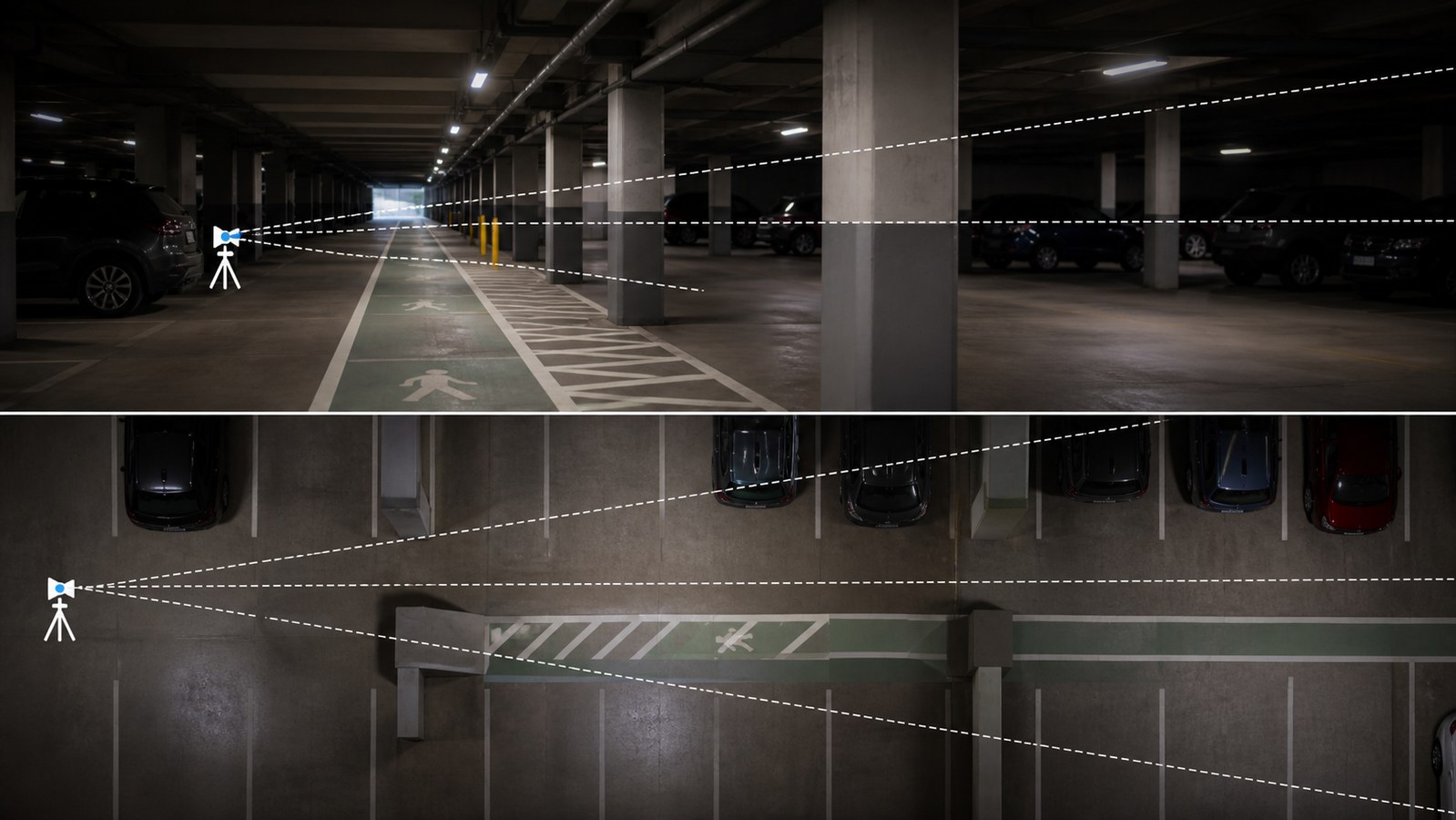
Visibility depends on geometry, viewing direction, distance, contrast, illumination, obstructions, and the person’s changing position. A camera placed at eye height can be informative, but it is not automatically a reliable model of human perception. If the case depends on conspicuity or reaction, a human-factors, lighting, engineering, or other qualified expert should control the assumptions.
When Did the Condition Exist?
Notice is often a chronology problem rather than a single frame. A timeline can align an inspection log, transaction record, employee movement, cleaning activity, work order, weather record, photograph, call, or surveillance segment. It should not fill undocumented intervals with invented activity.
How Does the Condition Relate to the Claimed Mechanism?
A slip and fall accident animation may illustrate a biomechanical or engineering opinion, but the animator should not decide why a person lost balance. Foot placement, friction, gait, center-of-mass movement, and injury mechanism may require different experts. The production should show only the opinions each expert is qualified and prepared to support.
Premises Case Types That Benefit From Visual Explanation
Retail and Hospitality Incidents
Store aisles, entrances, restaurants, hotels, and event spaces can combine changing pedestrian traffic with temporary conditions. Useful visuals may compare the incident route with the location of displays, mats, cones, cleaning equipment, cameras, or inspection points. The goal is spatial clarity, not a cinematic spill effect.
Stairs, Ramps, Curbs, and Changes in Elevation
A model can reveal riser and tread geometry, landing dimensions, handrail continuity, slope, cross-slope, nosing contrast, drainage, and the relationship between a route and nearby doors or lighting. Code opinions and compliance conclusions remain with the qualified architect, engineer, accessibility specialist, or other retained expert.
Parking Lots, Garages, and Exterior Walkways
Exterior cases may involve pavement defects, wheel stops, lighting, landscaping, drainage, snow or ice, traffic paths, security cameras, or transitions between vehicles and sidewalks. A legal animation for unsafe property conditions can combine an overhead orientation with supported eye-level views and a time-of-day comparison.
Construction, Maintenance, and Temporary Work Areas
Temporary barriers, cords, tools, open access panels, material staging, floor protection, and rerouted pedestrians can change from one hour to the next. Versioned visuals can separate the normal configuration from the documented incident configuration and avoid presenting a later inspection as though it captured the earlier state.
Falling Objects, Shelving, and Facility Equipment
When a case involves storage, racks, doors, elevators, escalators, gates, or mounted objects, animation can illustrate geometry and an expert-supported mechanical sequence. It should not simulate forces or component failure unless the underlying method, inputs, and expert testimony support that use.
Build a Claim-to-Frame Evidence Map
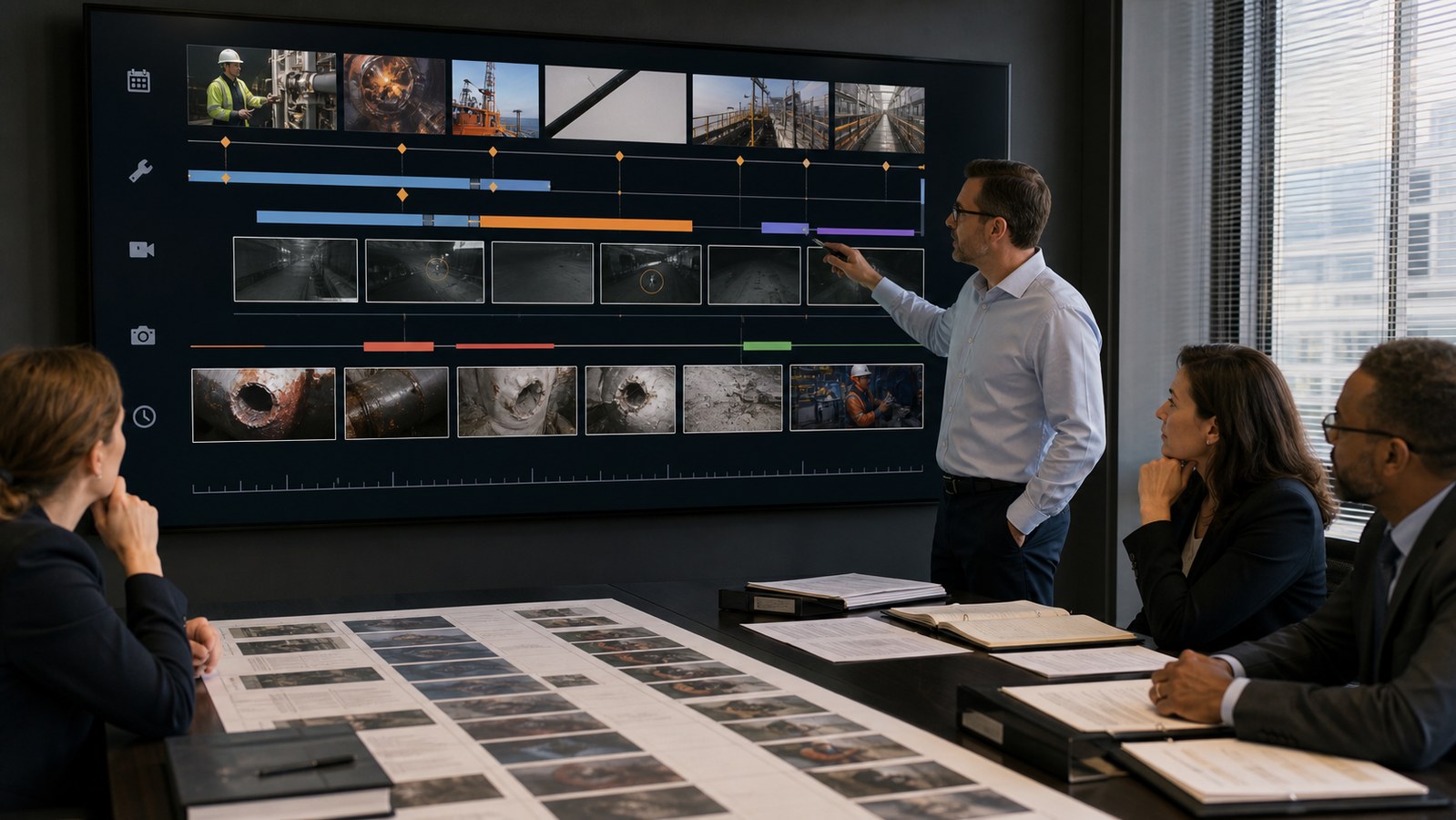
Before storyboarding, create a table that connects every proposed visual claim to its source, owner, confidence level, and intended use. One row might identify the measured width of a stair. Another might identify a disputed location from testimony. A third might describe an expert’s lighting calculation. The animator then knows which details can be modeled directly, which require expert approval, and which should remain absent.
This map prevents a common failure: a plausible-looking environment gradually becoming more specific than the evidence. It also makes revisions easier. When testimony changes or a new survey arrives, the team can identify which shots depend on that input instead of reviewing the entire production from memory.
Geometry Sources
Useful geometry sources include surveys, architectural drawings, as-built plans, laser scans, photogrammetry, total-station measurements, tape measurements, and photographs with reliable scale references. Each source has limits. A marketing floor plan, for example, may orient the viewer but may not be accurate enough for a code or visibility opinion.
Condition Sources
Surveillance, incident photographs, inspection images, maintenance records, witness descriptions, weather information, and physical evidence may describe the condition. Conflicts should not be silently resolved by the artist. Counsel and the relevant witness or expert should decide whether to create one supported version, competing versions, or a neutral base model.
Movement and Timing Sources
Video timestamps, frame analysis, access records, receipts, device data, witness testimony, and expert calculations can support timing. Where only a range is defensible, the animation can show that range or avoid a real-time sequence entirely. Precision on screen should never exceed precision in the source.
Choose the Right Visual Product
Orientation Model
An orientation model explains where things are. It can move from an aerial view to the relevant entrance, level, aisle, stair, or walkway, then identify key evidence locations. This may be sufficient when the audience is struggling with maps and photographs but the event sequence is disputed.
Illustrative Animation
An illustrative animation accompanies testimony or argument and depicts a supported explanation. It should be presented for the purpose counsel intends and disclosed on the schedule required by the court. Labels, restrained color, and pauses often communicate more clearly than photorealism.
Scientific or Engineering Simulation
A simulation uses a validated process or model to produce an output from data. It carries different foundation questions from an animation that simply illustrates an expert’s opinion. Friction analysis, lighting calculations, structural behavior, or human motion may involve specialized methods that must be explained and defended by the appropriate expert.
Timeline and Record Graphics
Not every premises case needs 3D movement. A maintenance chronology, inspection matrix, floor-plan sequence, annotated photograph, or synchronized surveillance excerpt may answer the key question more efficiently. Premises liability demonstrative evidence should be selected for comprehension, not technical novelty.
Medical and Injury Explanation
A separate medical animation can explain anatomy, diagnostic findings, treatment, or a physician’s mechanism opinion. Keeping the site sequence and medical explanation modular helps each expert review only the section within that expert’s field.

Federal Rule 107 and the Evidentiary Boundary
Federal Rule of Evidence 107, effective December 1, 2024, provides a specific framework for illustrative aids. A court may allow an aid that helps the trier of fact understand evidence or argument when that utility is not substantially outweighed by risks such as unfair prejudice, confusion, or misleading the jury. The rule also states that an illustrative aid is not evidence and ordinarily does not go to the jury during deliberations.
Other rules may still matter. Rule 401 addresses relevance. Rule 403 addresses dangers including unfair prejudice and confusion. Rule 702 governs expert testimony, including whether an opinion rests on sufficient facts and reliable methods properly applied. Rule 901 addresses authentication when an item is offered as evidence. State rules, local procedures, scheduling orders, and case-specific rulings can differ, so a courtroom animation for premises liability must be planned with the responsible attorney.
Courts also distinguish animation from simulation. In People v. Duenas, the California Supreme Court described an animation as a demonstrative used to help the jury understand substantive evidence, while a simulation analyzes data and reaches a conclusion. The court explained that an animation should fairly and accurately represent the evidence it illustrates. The decision is useful guidance, but it is not a universal admissibility rule for every jurisdiction or case.
A Production Workflow That Protects the Record
- Define the forum and purpose. Identify whether the visual is for investigation, expert analysis, mediation, deposition, a motion, opening, witness examination, closing, or another use.
- Organize the source package. Preserve file names, dates, versions, original photographs, video, drawings, records, transcripts, measurements, and expert materials.
- Create the evidence map. Connect each proposed visual fact to a source and reviewer, and identify disputes or uncertainty.
- Approve a neutral environment. Review dimensions, camera positions, evidence locations, and omitted details before depicting a party’s theory.
- Build low-detail scenario passes. Confirm movement, timing, labels, and the relationship to testimony before adding realistic materials or people.
- Record expert and legal approvals. Track comments and preserve the approved version used for each purpose.
- Test the actual presentation. Confirm aspect ratio, playback, pausing, frame access, courtroom equipment, backup files, and the ability to remove or modify a disputed segment.
What Should Not Be Animated?
Do not animate a precise fall, reaction, lighting condition, warning location, contaminant, inspection event, or mechanical failure merely because it makes the sequence easier to understand. Convenience is not foundation. If a detail is material and unsupported, simplify it, disclose it, present alternatives, or leave it out.
Avoid emotional camera work, slow motion used only for drama, frightened facial expressions, graphic injury, exaggerated body movement, or selective color that turns a disputed point into a visual conclusion. The audience should understand what the visual is illustrating and where testimony or expert opinion begins.
Why Choose Austin Visuals for Premises Liability Animation?
Austin Visuals can combine site modeling, 2D diagrams, timelines, evidence annotation, medical visualization, and courtroom delivery within one coordinated scope. That matters when a premises case contains several related explanations but each requires a different reviewer and evidentiary foundation.
Our recommended workflow creates a neutral property model first, then adds theory-specific layers only after the source and expert owner are identified. A claim-to-frame ledger accompanies production so counsel can trace a camera view, dimension, condition, label, or movement back to the material that supports it.
The deliverable can be divided into modular segments for mediation, expert examination, and trial rather than locking every idea into one long video. Learn more about our legal and litigation animation services and our approach to forensic animation.
Our Clients include:
Conclusion
Legal animation for premises liability cases is most credible when it explains the property before it explains the incident. A measured environment, source-controlled timeline, disciplined treatment of uncertainty, and expert-owned scenario can help the audience understand a difficult record without converting disputed assumptions into apparent facts.
Contact us at info@austinvisuals.com or call (512) 591-8024.
Frequently Asked Questions
What is legal animation for premises liability cases?
It is the use of evidence-based 2D or 3D visuals to explain a property’s layout, an alleged condition, sight lines, timing, pedestrian movement, expert opinions, or a claimed injury mechanism.
Can a premises liability animation be used in court?
Potentially, but the judge controls its use. Purpose, foundation, disclosure, expert support, relevance, accuracy, and the applicable federal or state rules all matter. Counsel should plan the visual around the forum and case schedule.
What evidence is needed to create a slip-and-fall animation?
Useful sources include photographs, surveillance, measurements, plans, scans, incident reports, inspection records, maintenance records, testimony, weather data, medical information, and qualified expert analysis.
What is the difference between an animation and a simulation?
An animation generally illustrates testimony or a supported account. A simulation applies a process or model to data and produces a result. Simulations may require additional validation, methodology, and expert foundation.
Can animation show whether a hazard was visible?
It can illustrate supported sight lines, lighting assumptions, contrast, distance, and obstructions. Conclusions about human perception or conspicuity should be directed by the appropriate qualified expert.
How long does a premises liability animation take?
A focused visual may take four to eight weeks. Detailed site reconstruction, disputed scenarios, multiple experts, medical segments, or accelerated litigation deadlines can change the schedule.
How much does premises liability animation cost?
Cost depends on the source condition, site complexity, number of scenarios, expert-review burden, realism, runtime, and deadline. Focused graphics may cost several thousand dollars, while detailed multi-expert 3D work can cost substantially more.